TRRepricerBETA
FeaturesPricingLog InGet Started →
Complete Product Tour

The Complete Takealot Toolkit.
Every Feature. Explained.

Automated repricing. Multi-channel sync. Live supplier cost monitoring. Real profit tracking. Walk through every feature and see exactly how they work together to protect your margins and grow your business.
🏆Win the Buy Box automatically
🔄Takealot + Website always in sync
📊All sales channels in one view
💰Know your real profit per sale
Standard Features
⚙️Getting Started🏆Buy Box Repricing📊Command Centre💰Sales Overview🔍Opportunity Scanner📜Price History
Pro Features — Advanced Automation
🧮BOM Monitor💹Cost Analyzer🔒Smart Floor Pricing
Step 01
Settings page screenshot
⚙️
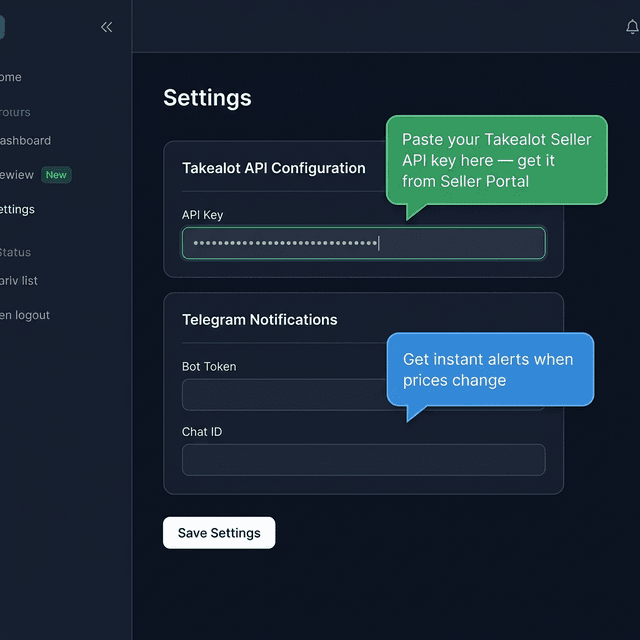
2-Minute Setup

Getting Started

“Connect Once. Automate Forever.”

Paste your Takealot API key, connect your website (WooCommerce, Shopify, or custom webhook), add Telegram for instant alerts, and link your suppliers. The entire setup takes under 2 minutes — and you never touch it again.
🔑Takealot API Key
Copy from your Seller Portal, paste it here. That's the only connection the system needs to read and reprice all your listings.
🌐Website Integration
Connect your WooCommerce, Shopify, or custom webhook. Prices sync automatically across every platform — Takealot and your website stay perfectly aligned.
📱Telegram Alerts
Get instant notifications on your phone when prices change, you win or lose the Buy Box, or the system takes action.
🏭Supplier Sources
Connect component suppliers (Wootware, Evetech, Rectron, etc.) for live cost tracking. The system checks them automatically.
💡
Once configured, everything runs on autopilot. You set it and forget it.
Step 02
Products page screenshot
🏆
Your Competitive Edge

Buy Box Repricing

“Win the Buy Box. Automatically. Every Single Day.”

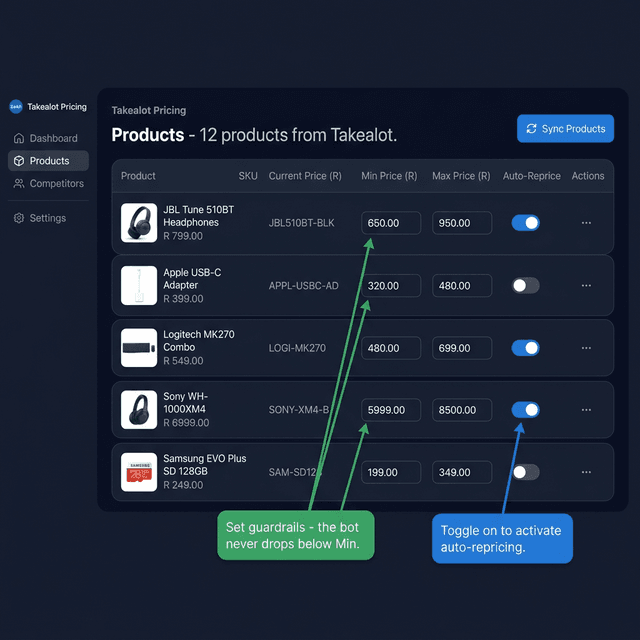
This is the core engine. It monitors every one of your Takealot listings, tracks competitor prices in real time, and adjusts your prices to win the Buy Box — all within the safety limits you set. No manual work. No spreadsheets.
🔄Continuous Repricing
The engine runs every few minutes, all day. When a competitor changes their price, you respond within the next cycle — not hours later.
🛡️Floor & Ceiling Protection
Set your absolute minimum (protect margins) and maximum (cap pricing). The engine competes aggressively but never crosses your limits.
👁️Competitor Intelligence
See who holds the Buy Box, their price, their seller name, and how you compare — right next to each product. Stay informed at a glance.
⚡One-Click Control
Toggle auto-repricing per product or for your entire catalog. Want to pause one listing? Flip the switch. Full control, always.
💡
Think of Floor/Ceiling as guardrails on a highway. The engine stays within your limits but competes hard to win the Buy Box.
Step 03
Dashboard screenshot
📊
Real-Time Dashboard

Command Centre

“Everything you need. Nothing you don't.”

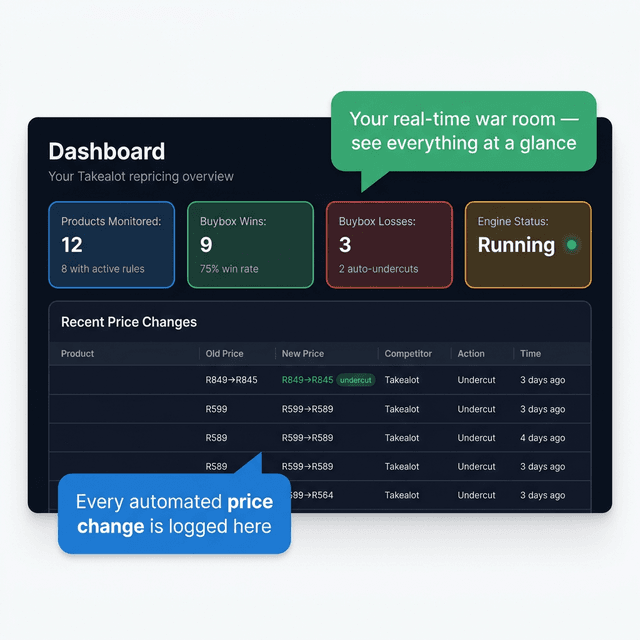
Your real-time overview of everything happening across your business. Buy Box status, price changes, engine activity, and performance stats — updated automatically every 5 minutes.

🏅Buy Box Scorecard
Instantly see how many products are winning vs. losing the Buy Box. Click the cards to filter and take action.
📋Live Price Activity
A rolling log of every automated price adjustment — old price, new price, competitor price, action taken, and timestamp.
🟢Engine Status
See if the repricing engine is running, idle, or when it last completed a cycle. Start and stop with one click.
📈Performance Stats
Products monitored, cycle count, adjustments made — all at a glance. No spreadsheets required.
💡
Open this dashboard in the morning and your overnight performance is already there. No manual refresh needed.
Step 04
💰
Sales Overview
Multi-Channel Intelligence
💰
Multi-Channel Intelligence

Sales Overview

“All your sales. Every platform. One screen.”

See sales from Takealot, your website, and any other platform — all in one unified view. Compare channels, track year-on-year growth, identify seasonal trends, and make data-driven decisions about where to focus your effort.
🏪Takealot Sales
Import via CSV or sync directly from the Takealot API. Monthly revenue, units sold, returns, cancellations — all tracked automatically.
🌐Website Sales
Pull orders directly from WooCommerce, Shopify, or custom webhooks. See your website performance alongside Takealot in one view.
📊Combined View
Merge all channels for a complete business picture. Compare Takealot vs. website performance, spot which channel deserves more attention.
📈Year-on-Year Comparison
Plot this month against last year's same month. See growth trends, seasonal dips, and revenue progress at a glance.
🏆Top Products
Know which products are your top revenue generators across all channels. Focus repricing strategy where it matters most.
💡
Switch between Takealot, Website, or Combined views with one click. See where your revenue is actually coming from.
Step 05
Opportunity page screenshot
🔍
Find Hidden Revenue

Opportunity Scanner

“Discover listings your competitors sell that you don't.”

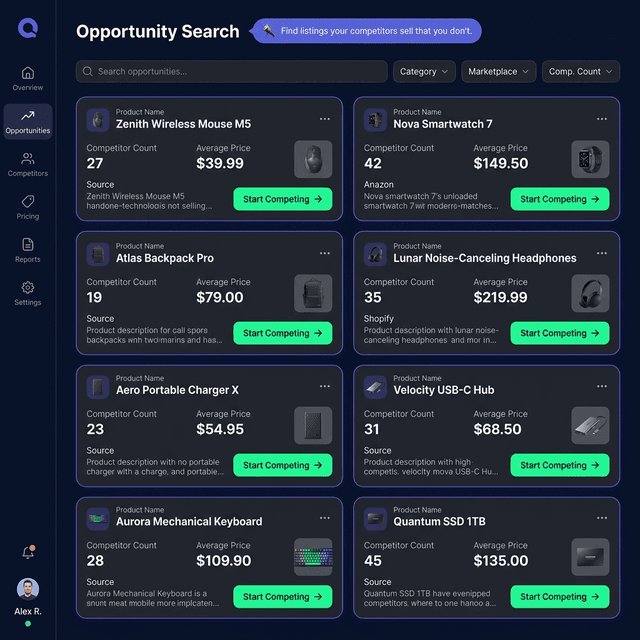
A feature no other tool offers. The scanner crawls Takealot categories and finds products your competitors are listed on — but you're not. It tells you the average price, number of sellers, and potential margin before you decide to jump in.
🎯Category Scanning
Set up categories to scan (e.g. "Gaming PCs over R10,000"). The system finds every listing where competitors are selling but you're absent.
💡Market Intelligence
Before you compete, see the average price, seller count, and rating. Make informed decisions, not guesses.
🚀One-Click Compete
Found a listing you can sell on? One click adds it to your monitored products with auto-repricing. Start competing immediately.
💡
Most sellers only compete on listings they already know about. This feature finds the ones you're missing — that's where easy revenue lives.
Step 06
History page screenshot
📜
Complete Audit Trail

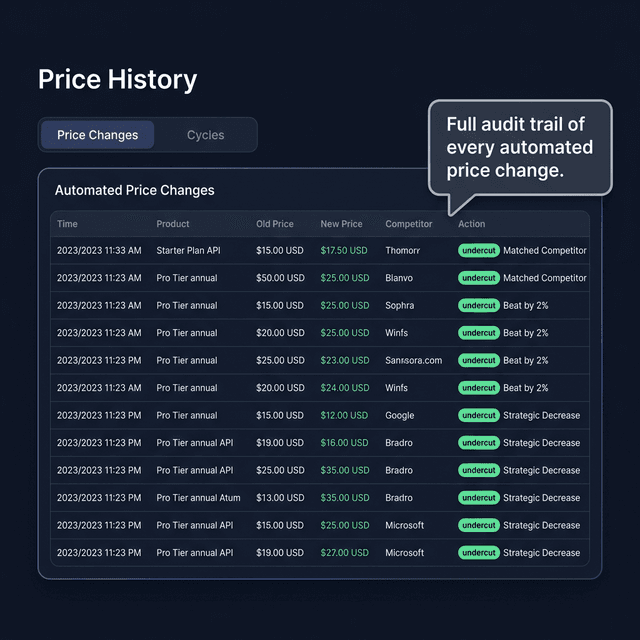
Price History

“Every move. Logged. Timestamped. Transparent.”

Complete transparency on everything the system does. Every price change is recorded with full context: what changed, why, and what triggered it. Review performance over days, weeks, or months.

📝Price Changes
Every individual adjustment: which product, old price, new price, which competitor triggered it, and what action was taken.
🔄Repricing Cycles
Each automated run is logged. See products scanned, wins, losses, and adjustments — all timestamped.
📊Strategy Review
Use the history to fine-tune your Floor/Ceiling strategy with data, not guesswork.
💡
This is your proof that the system is working. Every single move is traceable and auditable.
⚡ PRO FEATURES

The Automation That Changes Everything

Standard keeps you competitive on Takealot. Pro gives you a fully automated pricing chain — from supplier cost changes to Takealot prices to website sync, with complete visibility into your real margins on every sale.

🏭
Supplier costs change
→
🧮
BOM updates automatically
→
🔒
Floor prices adjust
→
🌐
Website + Takealot sync
PROStep 07
🧮

BOM Monitor

Automatic Price Protection
“Your products cost what they cost. Now you'll always know — automatically.”

The BOM (Bill of Materials) Monitor is the most powerful feature in the toolkit. It scans every product you sell, identifies the individual components, checks current supplier prices, and tells you if you're making money or losing it. When supplier prices change, the system adjusts your floor prices, updates Takealot, and syncs your website — all automatically. You never sell below cost again.

🤖
Fully automated pricing chain
🌐
Takealot + Website stay in sync
📋
Activity log tracks every change
🤖Auto Component Detection
The system reads your product titles and automatically identifies every part inside. No manual input — just accurate cost breakdowns.
💰Live Supplier Pricing
For each component, the system checks your connected suppliers (Wootware, Evetech, Rectron, etc.) for current pricing. No stale spreadsheets.
🔄Automatic Price Updates
When component costs change, the system recalculates your selling price, updates your Takealot floor price, and syncs your website — all without you lifting a finger.
🌐Website Sync
Your WooCommerce/Shopify prices stay perfectly aligned with Takealot. When BOM costs change, both platforms update automatically. Never sell at different prices again.
🛡️Autopilot Mode
Toggle Autopilot ON and the system handles everything overnight: check suppliers, update costs, adjust floors, push to Takealot, sync website. Wake up to an activity log of everything it did.
💡
This is the feature that transforms the repricer from a competitive tool into a complete business automation system. Your costs change? Everything downstream updates automatically.
PROStep 08
💹

Cost Analyzer

True Profit per Sale
“Every sale broken down to the last Rand. Fees, VAT, courier — all included.”

Stop guessing what your margins are. The Cost Analyzer takes every sale you've made, breaks it down component by component, and shows you the real profit — after subtracting Takealot fees, courier costs, VAT, and component costs. Not averages or estimates. Actual, per-sale profitability.

🧾
Courier, fees, VAT all deducted
💯
Per-sale margins, not averages
✅
Instant BOM accuracy validation
🧾Complete Cost Breakdown
Every sale is decomposed: component costs from live supplier data, Takealot commission, courier fees, VAT, packaging. You see exactly where every Rand goes.
📊Real Margin Calculation
Not "I think I made 30%." The system shows you made 28.4% on this exact sale, after every fee. That's the difference between profit and loss.
✅BOM Validation
At a glance, confirm your BOM is working correctly. When a sale comes in, the Cost Analyzer shows whether the BOM pricing was accurate. Instant quality check.
🛒One-Click Ordering
Click "Buy" to open the supplier page, logged in automatically. Click "Order All Parts" to open every component in tabs. Restock in seconds.
💡
This is the difference between "I think I'm profitable" and "I know my exact margin on every single sale, after all fees."
PROStep 09
🔒

Smart Floor Pricing

BOM-Based Minimum Prices
“Never sell below cost. The system makes sure of it.”

This is the feature that closes the loop. Based on your BOM cost analysis, the system calculates the ideal selling price for your target margin, then sets it as the repricer's floor price. If component costs go up tomorrow, your floor goes up automatically. You never accidentally sell at a loss.

🎯Set Floor from BOM
One click takes your BOM cost, applies your target margin (default 33%, fully customizable), and sets it as the repricer floor. The engine will never price below this.
📦Bulk Floor Update
Apply calculated floor prices to your entire catalog at once. One button protects every product based on live supplier costs.
🔄Always Current
Supplier prices change daily. The BOM monitor re-scans regularly and keeps your floors accurate. The system handles the math.
💡
This closes the loop: BOM Monitor → knows the cost. Floor Pricing → protects it. Repricer → wins the Buy Box within safe limits. Website Sync → keeps everything aligned.

How It All Works Together

Each feature feeds into the next. It's not a collection of tools — it's a complete automated system that protects your margins and grows your business.

🔄
Sync Products
→
🧮
Scan BOM Costs
→
🔒
Set Floor Prices
→
🏆
Win Buy Box
→
🌐
Sync Website
→
📊
Track Sales

Seen Enough? Let's Go.

Get your lifetime license and start winning the Buy Box today. One payment. No subscriptions. Every future update included.

Get Standard License →Get Pro License →

One-time payment. Lifetime updates. No recurring fees.

TRTakealot Repricer
FeaturesPricingTourLogin
© 2026 CustomBeast (Pty) Ltd. All rights reserved.